Understanding Authentication Errors in ZDT DevOps Platform
Authentication is a critical component of any secure application, and the ZDT DevOps Platform implements a robust JWT (JSON Web Token) based authentication system to ensure only authorized users can access the platform.
What is JWT Authentication?
JSON Web Tokens (JWT) are a secure way to transmit information between parties as a JSON object. In our platform, JWTs serve as digital credentials that verify a user’s identity and permissions. Think of them as digital ID cards that prove who you are and what you’re allowed to access.
How Authentication Works
When you log into the ZDT DevOps Platform, the following process occurs:
- Initial Login: You’re redirected to our VAS Auth system
- Credential Verification: Your username and password are validated
- Token Generation: A unique JWT token is created for your session
- Secure Redirect: You’re redirected back to the platform with your token
- Access Granted: The platform validates your token and grants access
Common Authentication Issues
Token-Related Problems
Missing Authentication Credentials Sometimes the authentication process doesn’t complete properly, leaving you without the necessary credentials to access the platform. This typically happens when:
- The authentication URL is incomplete or corrupted
- Network issues interrupt the login process
- Browser security settings block the authentication flow
Invalid Token Format Tokens can become corrupted during transmission or storage. This occurs when:
- Copy-pasting tokens manually introduces errors
- Network middleware modifies the token content
- Browser extensions interfere with the authentication process
Security Validation Failures Our platform performs rigorous security checks on every token. Validation can fail due to:
- Tokens being modified or tampered with
- Incorrect server configuration
- Using tokens from different environments or systems
Time-Related Issues
Expired Sessions For security reasons, authentication tokens have a limited lifespan. When tokens expire:
- You’ll need to re-authenticate through the VAS Auth system
- Any ongoing work should be saved before the session ends
- The system automatically redirects you to the login process
Configuration Problems
Server Misconfigurations Sometimes authentication issues stem from server-side configuration problems:
- Missing or incorrect security keys
- Improper environment variable settings
- Integration issues between systems
Algorithm Compatibility Our platform uses specific security algorithms for maximum protection. Issues can arise when:
- Tokens are generated using incompatible encryption methods
- Legacy authentication systems are used
- Third-party integrations use different security standards
Error Indicators
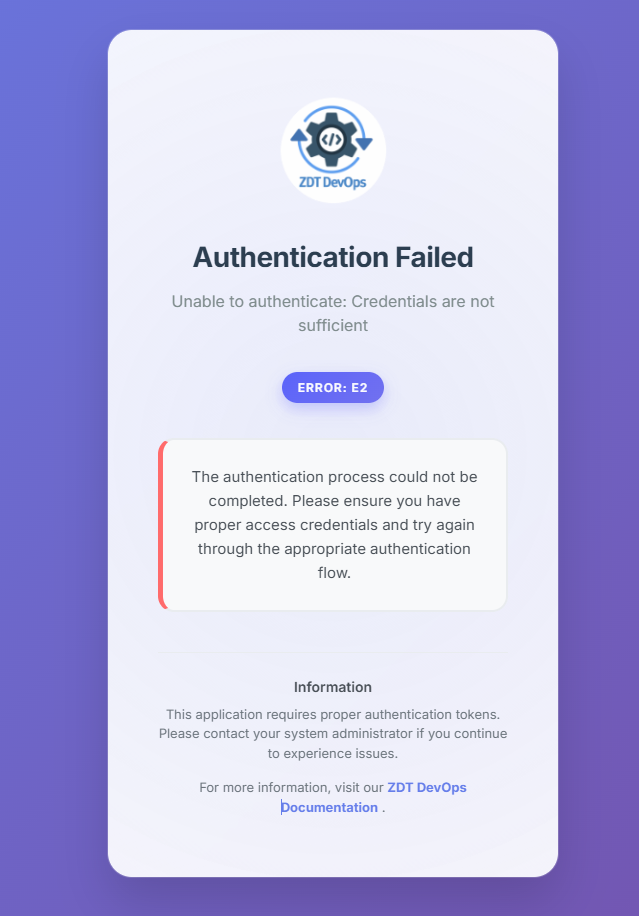
When authentication fails, the platform displays a user-friendly error page with:
- A clear indication that authentication failed
- A generic error code for technical support reference
- Links to documentation and support resources
- The ZDT DevOps logo for brand consistency
Best Practices for Users
Preventing Authentication Issues
Use Supported Browsers Ensure you’re using a modern, supported web browser with:
- JavaScript enabled
- Cookies and local storage allowed
- Up-to-date security certificates
Maintain Secure Sessions
- Don’t share authentication URLs with others
- Log out properly when finished
- Avoid using public computers for sensitive operations
- Keep your browser updated for security patches
Network Considerations
- Use secure, trusted network connections
- Avoid public Wi-Fi for accessing sensitive systems
- Ensure your firewall allows authentication traffic
- Check for proxy or VPN interference
When Problems Occur
Immediate Steps
- Try refreshing the page or restarting your browser
- Clear your browser cache and cookies
- Disable browser extensions temporarily
- Try accessing from a different browser or device
If Issues Persist
- Contact technical support with the error code displayed
- Provide details about your browser and operating system
- Describe the steps that led to the authentication failure
- Include any relevant screenshots (without sensitive information)
Security by Design
The ZDT DevOps Platform prioritizes security in every aspect of authentication:
Multi-Layer Validation Every authentication request goes through multiple security checks to ensure:
- Token authenticity and integrity
- User authorization and permissions
- System security and compliance
- Protection against common attack vectors
Secure Error Handling When authentication fails, the system:
- Provides minimal information to prevent security leaks
- Logs detailed information for administrative review
- Implements rate limiting to prevent brute-force attacks
- Maintains audit trails for security compliance
Integration with VAS Auth
Our authentication system seamlessly integrates with VAS Auth, providing:
- Single sign-on capabilities across multiple applications
- Centralized user management and permissions
- Enhanced security through established authentication protocols
- Streamlined user experience with automatic redirects
System Requirements
For optimal authentication performance, ensure your environment meets:
- Modern web browser (Chrome, Firefox, Safari, Edge)
- JavaScript enabled and unrestricted
- Secure HTTPS connections
- Proper time synchronization
- Network access to authentication servers
Troubleshooting Resources
If you encounter authentication issues:
Documentation: Visit our comprehensive ZDT DevOps Documentation for detailed guides and troubleshooting steps.
Support: Our technical support team is available to help resolve authentication problems and answer questions about platform access.
Updates: Stay informed about system updates and maintenance windows that might affect authentication services.
Conclusion
Authentication errors, while inconvenient, are an important part of maintaining platform security. The ZDT DevOps Platform’s authentication system is designed to be both secure and user-friendly, providing clear feedback when issues occur and multiple pathways for resolution.
By understanding how authentication works and following best practices, users can minimize authentication issues and maintain secure, productive access to the ZDT DevOps Platform.
For technical support or questions about authentication, please refer to our documentation or contact the support team with any error codes you encounter.
