ZDT Replicate: Complete Configuration Guide
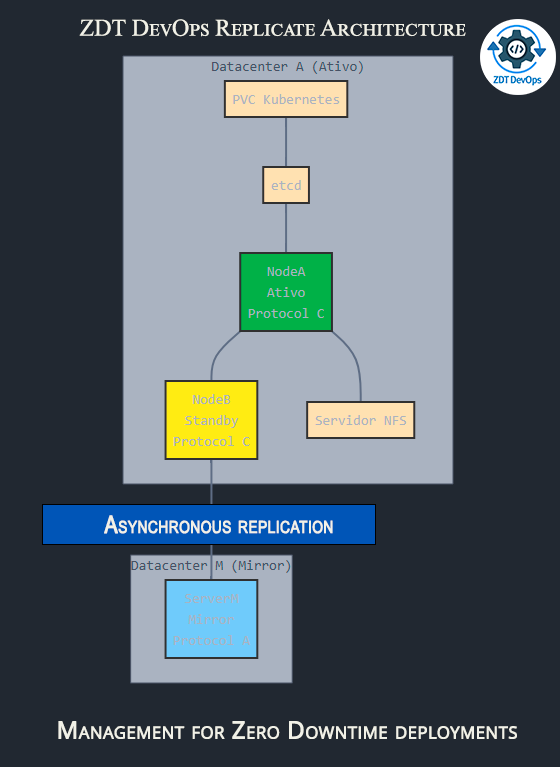
Welcome to our comprehensive guide on configuring ZDT Replicate, a powerful tool that simplifies DRBD (Distributed Replicated Block Device) management for Zero Downtime deployments. Whether you’re setting up high availability within a single datacenter or implementing disaster recovery across multiple sites, this guide will help you understand all available configuration options.
Configuration File Basics
ZDT Replicate uses a simple environment file (zdtreplicate.env) to store all configuration parameters.
This file must be located in your ZDT DevOps installation config directory:
The file uses a simple KEY=VALUE format, with parameters organized into logical sections. If the file doesn’t exist, you’ll need to create it in the correct location before running zdtreplicate commands.
Node Configuration
ZDTREP_NODE_TYPE
This parameter defines the role of the node in your replication topology.
| Possible values | primary, secondary, mirror, external |
| Default | primary |
| Description |
|
| Example | ZDTREP_NODE_TYPE=primary |
ZDTREP_NODE_ID
A unique identifier for this node in the DRBD configuration.
| Default | None (required) |
| Description | Should be a simple string without spaces |
| Example | ZDTREP_NODE_ID=nodeA |
ZDTREP_CLUSTER_ADDR
IP address or hostname of this node.
| Default | 127.0.0.1 |
| Description | Used for DRBD network communication |
| Example | ZDTREP_CLUSTER_ADDR=192.168.1.1 |
ZDTREP_DISK_DEVICE
Block device to be used for DRBD replication.
| Default | /dev/sdb1 |
| Description | The device will store replicated data. Warning: All data on this device will be erased during setup. |
| Example | ZDTREP_DISK_DEVICE=/dev/sdb1 |
ZDTREP_DATA_DIR
Directory where the DRBD device will be mounted.
| Default | /var/lib/etcd |
| Description | Typically where your application (e.g., etcd) will store its data |
| Example | ZDTREP_DATA_DIR=/var/lib/etcd |
Replication Configuration
ZDTREP_REPLICATION_PROTOCOL
DRBD replication protocol determining data consistency vs. performance trade-offs.
| Possible values | A, B, C |
| Default | C |
| Description |
|
| Recommendation | Use C for local nodes, A for cross-datacenter replication |
| Example | ZDTREP_REPLICATION_PROTOCOL=C |
ZDTREP_REPLICATION_PORT
Base TCP port for DRBD replication.
| Default | 7788 |
| Description | DRBD will use this port for network communication. Make sure this port is open in your firewall. |
| Example | ZDTREP_REPLICATION_PORT=7788 |
ZDTREP_BANDWIDTH_LIMIT
Network bandwidth limit for replication.
| Default | 0 (unlimited) |
| Format | Number followed by K, M, or G (e.g., 10M for 10 megabits/sec) |
| Description | Especially useful for cross-datacenter replication to avoid network saturation |
| Example | ZDTREP_BANDWIDTH_LIMIT=10M |
Remote Node Addresses
ZDTREP_PRIMARY_ADDR
IP address of the primary node.
| Default | Empty |
| Required for | Secondary and mirror nodes |
| Example | ZDTREP_PRIMARY_ADDR=192.168.1.1 |
ZDTREP_SECONDARY_ADDR
IP address of the secondary node.
| Default | Empty |
| Required for | Mirror nodes |
| Example | ZDTREP_SECONDARY_ADDR=192.168.1.2 |
ZDTREP_MIRROR_ADDRS
Comma-separated list of mirror node addresses.
| Default | Empty |
| Required for | External nodes |
| Example | ZDTREP_MIRROR_ADDRS=10.0.0.1,10.0.0.2,10.0.0.3 |
Monitoring Configuration
ZDTREP_MONITOR_INTERVAL
Time between status checks in seconds.
| Default | 60 |
| Description | Controls how frequently the monitor command checks replication status |
| Example | ZDTREP_MONITOR_INTERVAL=60 |
ZDTREP_MONITOR_LOG_PATH
Full path to monitoring log file.
| Default | /var/log/zdtreplicate.log |
| Description | The monitor command will write status information to this file |
| Example | ZDTREP_MONITOR_LOG_PATH=/var/log/zdtreplicate.log |
NFS Configuration (Optional)
ZDTREP_NFS_ENABLED
Enable NFS exports of the DRBD device.
| Possible values | true, false |
| Default | false |
| Description | Automatically configure NFS sharing of the replicated data. Useful for Kubernetes PVC integration. |
| Example | ZDTREP_NFS_ENABLED=true |
ZDTREP_NFS_EXPORTS_DIR
Directory to export via NFS.
| Default | /mnt/etcd-data |
| Description | Typically the same as ZDTREP_DATA_DIR or a subdirectory |
| Example | ZDTREP_NFS_EXPORTS_DIR=/mnt/etcd-data |
ZDTREP_NFS_ALLOWED_CLIENTS
Clients allowed to access the NFS export.
| Default | * (all clients) |
| Format | NFS exports syntax (* for all, IP/subnet for specific clients) |
| Example | ZDTREP_NFS_ALLOWED_CLIENTS=192.168.0.0/24 |
ZDTREP_NFS_OPTIONS
NFS export options.
| Default | rw,sync,no_subtree_check |
| Common options |
|
| Example | ZDTREP_NFS_OPTIONS=rw,sync,no_subtree_check |
Advanced Options
ZDTREP_METADATA_OPTIONS
Additional options for DRBD metadata creation.
| Default | Empty |
| Description | These options are passed directly to the ‘drbdadm create-md’ command |
| Example | ZDTREP_METADATA_OPTIONS=--max-peers=32 |
ZDTREP_RESOURCE_NAME_PREFIX
Prefix for DRBD resource names.
| Default | etcd-data |
| Description | The full resource name will be this prefix followed by the node ID |
| Example | ZDTREP_RESOURCE_NAME_PREFIX=etcd-data |
Creating and Editing the Configuration File
The zdtreplicate.env configuration file is available for download from the ZDT DevOps community repository on GitHub:
After downloading, place it in your configuration directory:
<your ZDT DevOps Installation path>/DevOps/config/zdtreplicate.env
Then, set the appropriate permissions:
sudo chmod 644 <your ZDT DevOps Installation path>/DevOps/config/zdtreplicate.env
You can still use your preferred text editor (e.g., nano, vim, code) to review or customize the configuration file as needed.
Configuration Examples
Primary Node in Main Datacenter
ZDTREP_NODE_TYPE=primary
ZDTREP_NODE_ID=nodeA
ZDTREP_CLUSTER_ADDR=192.168.1.1
ZDTREP_DISK_DEVICE=/dev/sdb1
ZDTREP_DATA_DIR=/var/lib/etcd
ZDTREP_REPLICATION_PROTOCOL=C
ZDTREP_REPLICATION_PORT=7788
ZDTREP_NFS_ENABLED=true
ZDTREP_NFS_EXPORTS_DIR=/mnt/etcd-data
Secondary Node in Main Datacenter
ZDTREP_NODE_TYPE=secondary
ZDTREP_NODE_ID=nodeB
ZDTREP_CLUSTER_ADDR=192.168.1.2
ZDTREP_DISK_DEVICE=/dev/sdb1
ZDTREP_DATA_DIR=/var/lib/etcd
ZDTREP_PRIMARY_ADDR=192.168.1.1
ZDTREP_REPLICATION_PROTOCOL=C
ZDTREP_REPLICATION_PORT=7788
Mirror Node in External Datacenter
ZDTREP_NODE_TYPE=mirror
ZDTREP_NODE_ID=dcmirror
ZDTREP_CLUSTER_ADDR=10.0.0.1
ZDTREP_DISK_DEVICE=/dev/sdb1
ZDTREP_DATA_DIR=/var/lib/etcd
ZDTREP_PRIMARY_ADDR=192.168.1.1
ZDTREP_SECONDARY_ADDR=192.168.1.2
ZDTREP_REPLICATION_PROTOCOL=A
ZDTREP_REPLICATION_PORT=7788
ZDTREP_BANDWIDTH_LIMIT=10M
Troubleshooting
If you encounter issues with your configuration:
- Verify that the configuration file exists in the correct location (
<your ZDT DevOps Installation path>/DevOps/config/zdtreplicate.env) - Check that the file has the correct permissions (readable by the ZDT system)
- Check the log file specified in
ZDTREP_MONITOR_LOG_PATH - Verify that the disk device specified in
ZDTREP_DISK_DEVICEexists and is not in use - Ensure network connectivity between nodes on the port specified in
ZDTREP_REPLICATION_PORT - Check firewall rules to allow DRBD traffic between nodes
Conclusion
The ZDT Replicate configuration system is designed to be flexible yet straightforward, allowing you to set up complex replication topologies with minimal effort. By properly configuring the parameters described in this guide and placing the configuration file in the correct ZDT DevOps config directory, you can create a robust Zero Downtime infrastructure that protects your data against both hardware failures and datacenter outages.
If you have questions or need assistance with your ZDT Replicate configuration, please reach out to our support team.
Error: Contact form not found.
